

The "Green Score" Obsession
Every website owner knows the feeling. You run your site through Google PageSpeed Insights, hoping for a perfect 100. Instead, you get a punishing Red score of 45 on mobile.
Panic sets in. You start installing “Speed Booster” plugins. You check boxes that say “Minify HTML” or “Defer JS.” Suddenly, your site loads faster—but your menu is broken, the slider doesn’t work, and your contact form has vanished.
Achieving a 90+ Green Score is the holy grail of SEO, but getting there without destroying your site’s functionality requires a strategic approach.
At OGROJ, we fix slow websites daily. Here is the roadmap we use to take clients from Red to Green safely.
1. Stop Blaming Your Internet Connection
First, understand what Google is actually measuring. It isn’t measuring how fast you see the site on your high-speed WiFi. It is measuring “Core Web Vitals”—specifically how a user on a standard 4G mobile connection experiences it.
⏱️ LCP (Largest Contentful Paint): How long until the main content is visible?
📏 CLS (Cumulative Layout Shift): Does the page jump around while loading?
2. The "Safe" Optimization Checklist
Before you install aggressive plugins, fix the basics that won’t break your code.
A. Image Optimization (The Low-Hanging Fruit)
Uploading raw images from your camera or Unsplash is the #1 speed killer. A 5MB image is a disaster for mobile data.
🛠️ The Fix: Convert all images to WebP format. It reduces size by ~30% without losing quality. We automate this for our clients so they never have to worry about it.
B. Taming Third-Party Scripts
Do you really need that Facebook Pixel, Hotjar, Google Analytics, Chatbot, and LinkedIn Insight Tag loading all at once?
🛠️ The Fix: Delay the execution of non-essential scripts. Let the main content load first, then load the chat widget 3 seconds later. This instantly boosts your score.
C. Server Response Time (TTFB)
If your hosting takes 2 seconds just to start sending data, no amount of optimization will help.
🛠️ The Fix: Move away from shared “cheap” hosting. At OGROJ, we deploy on cloud-based architectures (like Vercel or VPS) where the Time to First Byte (TTFB) is under 200ms.
3. The "Cheat Code": Switching to Next.js
Sometimes, WordPress is just too heavy. If you have 50 plugins running, you are trying to win a race with a backpack full of rocks.
For our premium clients who need a guaranteed 90-100 Score, we don’t just “patch” the site—we rebuild the frontend using Next.js.
Why Next.js Wins:
Why Next.js Wins: 🚀 Static Generation: It builds the page before the user visits.
📦 Zero Bloat: It only loads the exact JavaScript needed for that specific page.
🛡️ Security: It is significantly harder to hack.
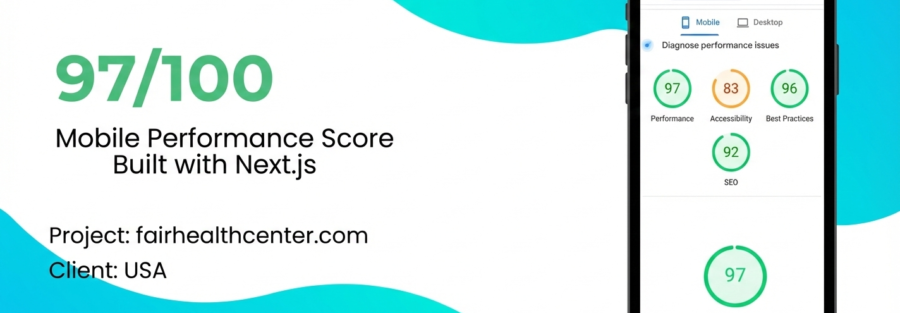
Case Study: Hitting 97/100 on Mobile
We recently optimized a healthcare platform, Fair Health Center (Texas, USA). They needed a patient portal that loaded instantly.
By moving their architecture to a Next.js framework and implementing strict code-splitting, here are the results:
❌ Previous Score: ~50 (Red)
✅ New Mobile Score: 97/100 (Green)
⚡ Load Time: 0.8 Seconds
We achieved this without breaking a single feature. The booking engine, maps, and interactive elements all work flawlessly—just faster.
Don't Risk Your Revenue
A DIY approach to speed optimization is risky. One wrong setting in a cache plugin can take your checkout page offline.
If your business relies on your website, you need a professional audit.
Ready to see your score turn Green? Let OGROJ analyze your site. We will tell you exactly what is slowing you down and how we can fix it—guaranteed.
[Get Your Free Speed Audit] https://wa.me/8801701005272